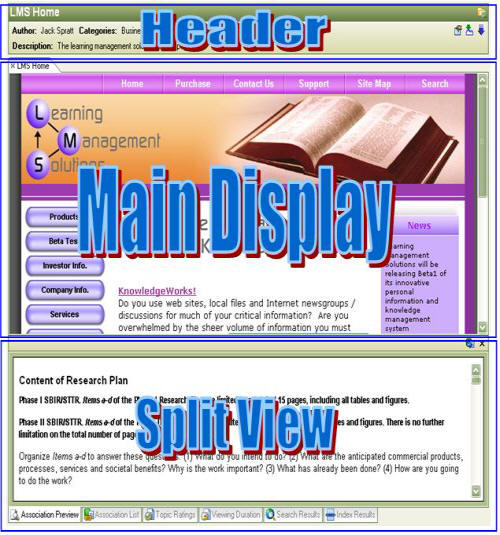
The Content Pane
The content pane
displays information selected in the navigation
pane. The
main display area is always visible
and may, depending on mode, show web content, files, email, notes, discussion
postings, a task list or a list of highlights applied to web content.
Two additional
display areas may be turned on manually or automatically as needed by
the program. The
header area can be toggled on/off
by clicking on the  toolbar icon or selecting the "Hide/Show
Headers" from the View menu. It
contains descriptive summary
information about an item selected in the tree or the hoist
area. The
content of the item does not need to be displayed for its header information
to be visible and can therefore be used to determine if you have selected
the appropriate item before opening it.
toolbar icon or selecting the "Hide/Show
Headers" from the View menu. It
contains descriptive summary
information about an item selected in the tree or the hoist
area. The
content of the item does not need to be displayed for its header information
to be visible and can therefore be used to determine if you have selected
the appropriate item before opening it.
The split view
enables you to display content simultaneously with the content of the
Main Display. It
can be toggled on/off by clicking on the  toolbar
icon or selecting the "Hide/Show Split View" from the View menu.
By default
it contains information about the item selected in the tree which includes
attributes of the item and further
details about associated items.
Content
windows can be exchanged between the Split View and the Main Content display
area by dragging a tab from its row to the row of tabs in the other panel.
toolbar
icon or selecting the "Hide/Show Split View" from the View menu.
By default
it contains information about the item selected in the tree which includes
attributes of the item and further
details about associated items.
Content
windows can be exchanged between the Split View and the Main Content display
area by dragging a tab from its row to the row of tabs in the other panel.