The most effective way to store information is to place it in one location so that it can be maintained easily. If information is copied to multiple locations changes must be made multiple times. However, there are many instances where information is relevant to multiple projects or areas of interest. KnowledgeWorkshop enables you to store information in a single location but connect it to many other items with associations and multiparenting. Associations can be created between any combination of items located in your tree. Each item can be connected to, and receive connections from, many other items. Associated items are shown in the Associated Items panel of the Nav pane The Navigation pane (Nav pane) is the primary mechanism for selecting the mode and items displayed in KnowledgeWorkshop. whenever the item is selected. Note- it need not be displayed only selected.
Associations are not just simple connections. They have direction - either to, from or between the two associated items. They also have captions that explain why the connection exists. In addition, since some connections between items are more important than others, associations can have a strength or importance. The Associated Items panel automatically sorts associations by strength.
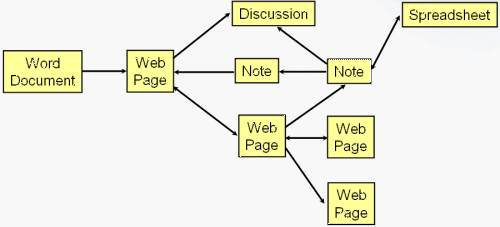
Associations provide a path to follow from one related item to another as shown in the diagram below.
To follow a path click on the first item to reveal its associated items. Open the associated item of interest to see its associated items. Repeat this process as often as needed.