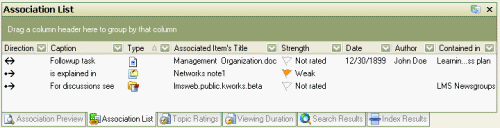
This tab displays the details of associations between the item selected in the Nav pane The Navigation pane (Nav pane) is the primary mechanism for selecting the mode and items displayed in KnowledgeWorkshop. or Hoists tree (but not necessarily currently displayed) and other items.
The following columns of information are visible in this tab:
Direction. The direction of the relationship between the selected item in the Nav pane and the item listed in the Associated Item's Title column. Associations can be considered as to, from and between as described by the arrow.
Title. A phrase explaining why the two items are associated.
Type. An icon indicating the associated items type. E.g. a note, newsgroup or task.
Associated Item's Title. The title of the item as defined by its properties.
Strength. A colored flag indicating the strength or importance of the association A link or cross reference between two information elements that explains how and why the connection exists. .
Contained in. The folder containing of the item.
The properties of the association can be displayed and edited by right clicking anywhere in the row and selecting [Properties] from the menu. New associations can be created by right clicking within the panel and selecting [New Association]. Right clicking on an association in the list enables you to delete it, show its properties and edit those properties.
Associations can be sorted by clicking on the header of each column. The sort order can be reversed by clicking on the column header a second time. Groups can be created by dragging column headers into the gray grouping area above the columns. Multiple nested A display mechanism that shows a related item below and slightly to the right of the item above it groups can be created by dragging additional column headers under each other in the group area. Grouping can be eliminated by dragging headers back to their original location.