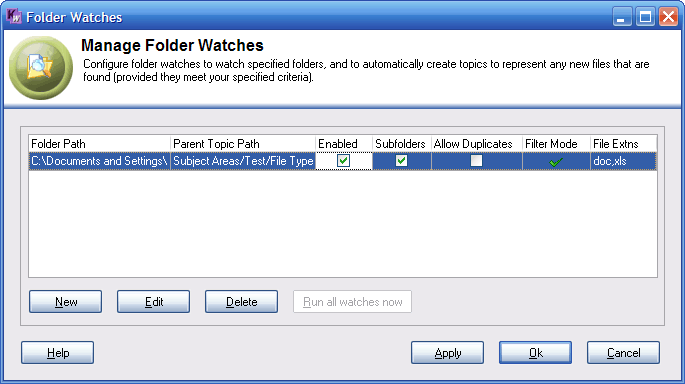
Location: Tools menu - Manage Folder Watches.
The table lists existing folder watches. The columns are:
Folder Path: Identifies the folder being watched.
Parent Item Path: Identifies the path to the item in KnowledgeWorkshop under which new items will be created when new files are detected in the watched folder.
Enabled: When checked the folder watch is turned on.
Subfolders: When checked, the watch is applied to all subfolders within the watched folder, otherwise it applies only to files at the first level in the folder. Subfolders are automatically created within the KnowledgeWorkshop item tree.
Allow Duplicates: When checked, the watch will create a topic for a newly discovered file under the designated parent topic even if a topic with a URL pointing at that file already exists elsewhere in your knowledgebase. If you move an item out of a item folder to another location in your structure and Allow Duplicates is enabled the item will be recreated the next time the file folder is scanned by the watch.
Filter Mode: This indicates the way your file type filter is configured.
A single check mark indicates that only files having file name extensions which are listed in the file extensions filter will have topics created for them.
A cross indicates that all files except those having file name extensions which are listed in the filter will have topics created for them.
A double check mark indicates that all new files will have topics created for them, regardless of file extension.
File Extns: Lists the file extensions in the filter.
[New]: To create a new folder watch, click the [New] button.
[Edit]: To edit a property of a watch, either double-click the respective row in the table, or select the row and click the [Edit] button.
[Delete]: To delete one or more folder watches, select the respective rows in the table and click the [Delete] button.
[Run all watches now]: Trigger the background scanning to begin immediately by clicking the [Run all watches now] button. This button will be grayed out if you have made any changes to the list of watches. You must first apply the changes made by clicking on the [Apply] button.
[Apply]: The [Apply] button is equivalent to clicking [OK] in that it commits any changes you have made, however the form remains open. A subsequent click on [Cancel] will not undo applied changes.